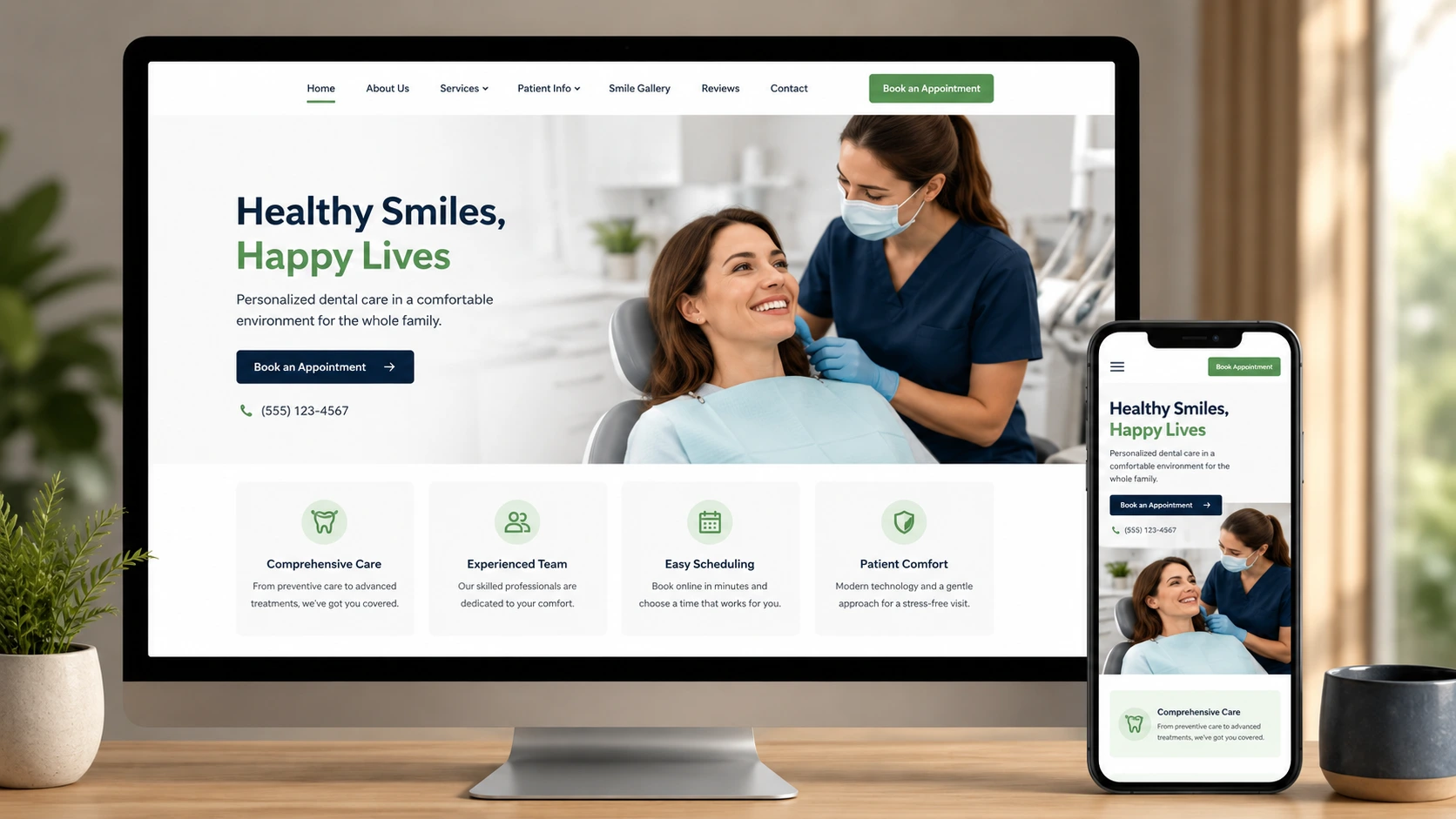

Redesigning your website without a plan is one of the fastest ways to lose search rankings, confuse your visitors, and tank the leads you were counting on. Businesses often approach a redesign as a purely visual project — new colors, new layout, new “modern” look — and forget that a website is also a technical asset gained over the years over time of working SEO links, equity and indexing content. That’s exactly the gap professional website redesign services are built to close. A solid website redesign checklist keeps every moving piece — SEO, design, content, and testing — on track so your new site performs better than the old one, not worse.
This guide walks through everything you need before, during, and after a redesign, including a dedicated SEO checklist for website redesign projects and a contractor website redesign checklist for service-based businesses with unique local SEO needs. By the end, you’ll have a complete, repeatable process you can use for this redesign and every one after it.
Why You Need a Website Redesign Checklist
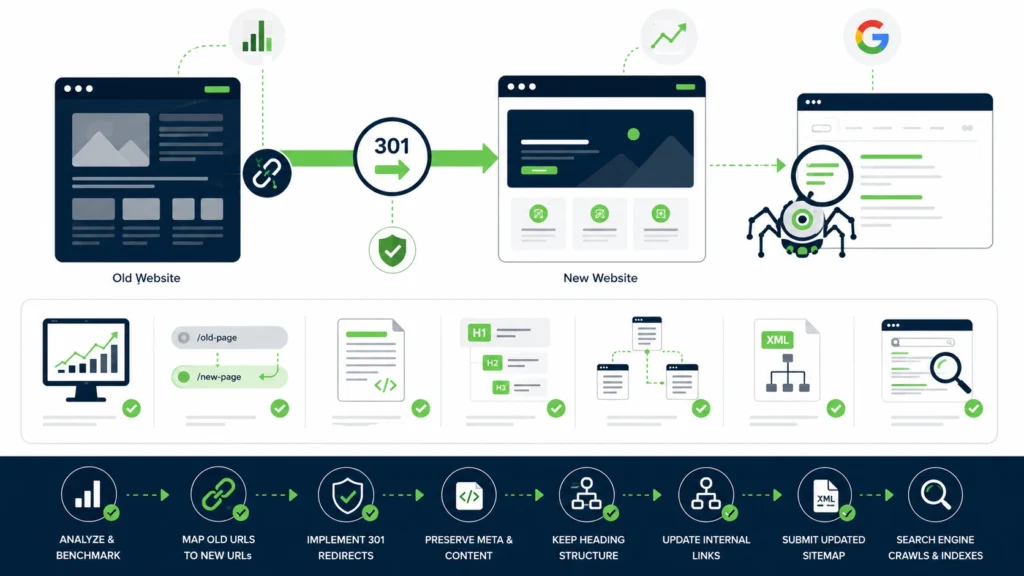
A redesign touches nearly every part of your site at once — layout, content, code, and URLs. Without a structured redesign website checklist, it’s easy to overlook something small that causes a big problem after launch. Think of a checklist not as bureaucracy, but as insurance against the kind of mistakes that are cheap to prevent and expensive to fix after the fact.
Common Risks of Redesigning Without a Plan
The most common redesign failures aren’t design mistakes — they’re process mistakes. Missing redirects break inbound links from other sites, social media, and email campaigns that have been pointing to your old URLs for years. Pages deleted by deletion erase years or months of SEO-related value often without notice until weeks later, when traffic begins to drop. Untested forms quietly stop sending leads to your inbox, which might not get noticed until someone asks why the phone stopped ringing. None of these show up immediately, which is exactly why a checklist matters more than raw creativity here — creativity doesn’t catch a broken redirect map.
There’s also a people-side risk worth naming: internal teams sometimes assume “the developer” or “the agency” is handling SEO continuity, while the developer assumes marketing owns that piece. A checklist assigns clear ownership so nothing falls into that gap.
SEO, UX, and Business Impact of a Rushed Redesign
A poorly planned redesign can cause a real drop in organic traffic — sometimes for months — if search engines can’t properly crawl and understand the new site. This isn’t rare; it’s one of the most well-documented risks in SEO, and it happens to small business sites and enterprise sites alike when the technical side of a redesign gets rushed.
Beyond SEO, a confusing new layout can frustrate returning visitors who knew exactly where things were on the old site and now can’t find anything. Slow load times can push potential customers away before they see anything at all — page speed is one of the first things visitors judge, often within seconds. Treating the redesign as a business project, not just a design refresh, protects the revenue your website already generates, rather than treating that revenue as something to figure out again after launch.
Pre-Redesign Planning Checklist
Before any design work starts, get clear on what you’re actually trying to fix or improve. Skipping this step is how projects end up redesigning things that were never actually broken, while ignoring the parts that were.
Define Your Redesign Goals
Are you redesigning because the site looks outdated, because it’s not converting visitors, or because it’s not ranking well? Each goal points to different priorities. A site that looks fine but converts poorly needs a different approach than a site that ranks poorly but converts well once visitors arrive. Write these goals down before you touch a single page — they’ll guide every decision that follows, from which pages get the most design attention to how much SEO work is required.
It also helps to define what “success” looks like in measurable terms. “Increase quote requests by 20% within three months of launch” is a goal you can actually track. “Make the site look better” is not.
Audit Your Current Website
Go through your existing site page by page. Note which pages drive traffic, which pages convert, and which ones are dead weight. Pull data from your analytics platform to identify your top 20–50 pages by traffic and conversions — these are the pages that deserve the most care during migration, since they’re already proven performers.
This audit becomes the foundation for what gets kept, merged, or cut during the redesign. It also surfaces technical issues worth fixing regardless of the redesign — broken links, outdated plugins, orphaned pages with no internal links pointing to them.
Set a Budget and Timeline
Redesigns without a firm budget and timeline tend to drag on indefinitely, with scope quietly expanding every time someone has “one more idea.” Decide upfront what you’re willing to spend and by when you need the new site live. Build in buffer time for testing and content migration specifically — these two phases are the most commonly underestimated parts of any redesign timeline.
Choose the Right Team or Platform
Decide early whether this redesign will be handled in-house, by a freelancer, or by an agency, and whether you’re staying on your current platform or migrating to a new one (for example, moving from a legacy CMS to WordPress or a modern website builder). If you go the WordPress route, it’s often worth choosing to hire a WordPress developer rather than learning the platform from scratch mid-project. Platform migrations add complexity — and additional SEO risk — that a simple visual refresh doesn’t carry, so factor that into your timeline and checklist scope.
SEO Checklist for Website Redesign
This is the section most redesigns get wrong. A website redesign seo checklist protects the rankings and traffic you’ve already earned, and it deserves more attention than most teams give it.

Benchmark Current Rankings and Traffic
Before launch, record your current keyword rankings, organic traffic numbers, top-performing pages, and conversion rates by page. Export this data and store it somewhere accessible — you’ll need this baseline to confirm the redesign didn’t hurt performance once it’s live, and to diagnose quickly if something does go wrong.
Create a URL Redirect Map
If any URLs are changing — and they usually do during a redesign — map every old URL to its new equivalent with 301 redirects. This should be a literal spreadsheet: old URL in one column, new URL in the next. Skipping this step is the single most common cause of post-redesign traffic loss, because it breaks the trail search engines and other websites use to find your content.
Pay special attention to your highest-traffic pages here. A redirect mistake on a low-traffic page is a minor annoyance; the same mistake on your top landing page can cost real revenue.
Preserve Metadata and Header Tags
Title tags, meta descriptions, and header tags (H1, H2, etc.) carry SEO weight that’s built up over time through search engine indexing and click-through history. Carry these over to the new pages rather than starting from scratch, unless there’s a clear, tested reason to rewrite them. If you do rewrite metadata, do it thoughtfully and monitor performance afterward rather than changing everything at once.
Maintain Internal Linking Structure
Internal links help search engines understand your site’s structure and pass authority between pages. When redesigning, make sure important internal links are rebuilt in the new site rather than left pointing to deleted pages or old URL structures. This is easy to overlook because internal links are scattered across dozens or hundreds of pages, not centralized in one place — which is exactly why it needs its own checklist item rather than being assumed as “handled.”
Keep XML Sitemap and Robots.txt Updated
Generate a new XML sitemap reflecting the redesigned site structure, and double-check your robots.txt file isn’t accidentally blocking search engines from crawling the new pages. This mistake is more common than it sounds — a robots.txt file left over from a staging environment, still blocking all crawlers, has quietly killed the search visibility of more than one freshly launched site.
Watch for Duplicate or Thin Content Introduced by the Redesign
Some redesigns unintentionally create near-duplicate pages — for example, a new “Services” page that overlaps heavily with an existing blog post on the same topic. Review new page content against existing content before launch to avoid confusing search engines about which page should rank.
Design and UX Checklist
Good design isn’t just about looks — it directly affects how long visitors stay and how easily they convert. A beautiful site that’s hard to use will still underperform a plain site that’s easy to navigate.
Mobile Responsiveness
Most website traffic today comes from mobile devices, and search engines evaluate the mobile version of your site as the primary version for ranking purposes. Test every page on multiple screen sizes to confirm nothing breaks, overlaps, or gets cut off — not just the homepage, but service pages, contact forms, and any pages with tables or embedded content, which tend to break first.
Page Speed Optimization
Slow-loading pages drive visitors away and hurt search rankings. Compress images before uploading them, minimize unnecessary scripts and plugins, and test load times using a tool before launch rather than after. A common redesign mistake is adding heavy animations or large background videos for visual appeal without testing their impact on load time.
Navigation and Site Structure
Visitors should be able to find what they need in a few clicks. Simplify menus, remove outdated links, and organize categories logically. If your current site has grown a bloated navigation menu over the years — a common byproduct of adding pages one at a time without ever revisiting the overall structure — a redesign is the natural time to fix it.
Accessibility Standards (WCAG)
Following Web Content Accessibility Guidelines (WCAG) ensures your site works for visitors using screen readers or other assistive technology — and it’s increasingly a legal requirement in many industries and jurisdictions. This includes proper color contrast, descriptive alt text for images, and a logical heading structure that assistive technology can navigate.
Visual Consistency and Branding
A redesign is also a chance to tighten up brand consistency — fonts, colors, button styles, and imagery should feel cohesive across every page, not just the homepage the design team spent the most time on. Inconsistent styling on inner pages is one of the most common signs of a rushed redesign. Industries with stricter compliance and UX expectations, such as medical website design, often need extra attention here to balance trust-building visuals with accessibility requirements.
Contractor Website Redesign Checklist (Industry-Specific Considerations)
Service-based businesses like contractors have unique needs a generic redesign checklist doesn’t always cover, which is why many turn to custom website development services built around lead generation rather than a generic template. A contractor website isn’t just a digital brochure — it’s a lead generation tool competing directly against other local businesses for the same searches.
Local SEO Elements for Contractors
Make sure your redesigned site includes accurate name, address, and phone number (NAP) information, location-specific service pages, and an embedded map. These elements directly affect how well you rank in local search results. If your business serves multiple service areas, consider dedicated pages for each major area rather than relying on a single generic “service area” page.
Lead Capture Forms and CTAs
Contractors rely heavily on quote requests and consultation bookings, so every key page should have a clear, easy-to-find call-to-action — not just the homepage or a single contact page buried in the navigation. Every form needs to be tested before launch to confirm leads actually come through to the right inbox or CRM, and confirmation emails or messages should be checked as well.
Showcasing Portfolio/Project Galleries
Before-and-after project photos build trust fast, especially for contractors where potential customers are evaluating quality of work before ever making contact. Make sure your redesign includes an organized, easy-to-browse gallery — ideally filterable by project type — rather than burying past work in a hard-to-find page or a single unsorted image dump.
Licensing, Reviews, and Trust Signals
Displaying licenses, certifications, insurance information, and customer reviews prominently reassures potential customers you’re legitimate — something especially important for contractors competing on trust as much as price. Consider placing review snippets near key conversion points, like next to a quote request form, rather than only on a separate testimonials page.
Service Page Depth
Rather than one general “Services” page listing everything briefly, dedicated pages for each major service (roofing, remodeling, plumbing, and so on) tend to perform better in search and give potential customers more confidence that you specialize in what they need done.
Content Migration Checklist
Auditing Existing Content
Review every page of content before migrating it. Some pages deserve a spot on the new site as-is; others need updates, and some should be retired entirely. This is also a good moment to check for outdated claims, old promotions, discontinued services, or pricing that no longer applies.
Updating and Repurposing Old Pages
Outdated statistics, old service offerings, or stale blog posts should be refreshed rather than carried over unchanged. This is a good opportunity to improve content that was underperforming — expanding a thin page, adding updated examples, or combining several overlapping pages into one stronger page.
Avoiding Duplicate Content Issues
If old and new pages both go live temporarily during a phased rollout, or if content gets copied across multiple new pages, it can create duplicate content issues that confuse search engines about which version should rank. Use canonical tags where needed and remove outdated versions promptly once the new page is confirmed working.
Preserving High-Value Content Assets
If certain blog posts, guides, or resources have earned backlinks from other websites over time, make absolutely sure those specific URLs are preserved or properly redirected. Losing a page with dozens of external links pointing to it is one of the costliest content migration mistakes. This risk is especially high during an ecommerce website redesign, where individual product pages often carry significant earned traffic and backlinks of their own.
Pre-Launch Testing Checklist
Cross-Browser and Device Testing
Test the new site across major browsers and device types before launch. What looks fine in one browser can break in another, and a layout that works perfectly on a laptop can look completely different on a tablet or older phone.
Broken Link and 404 Checks
Run a full site crawl to catch broken internal links and unexpected 404 errors before real visitors encounter them. This is a fast, low-effort check that catches a surprising number of issues right before launch.
Form and Functionality Testing
Every contact form, quote request, or checkout process needs a real test submission to confirm it works end-to-end, not just that it looks correct on screen. Test on both desktop and mobile, since form behavior sometimes differs between the two.
Analytics and Tracking Setup
Reinstall and verify analytics tracking, conversion goals, and any advertising pixels before launch. Losing tracking data during a redesign makes it impossible to measure the results afterward — and it’s one of the easiest things to forget, since it doesn’t affect how the site looks or functions for visitors.
Security and SSL Verification
Confirm your SSL certificate is properly installed and active on the new site, and that there are no mixed-content warnings (a common issue when old image or script links still point to non-secure URLs). A broken SSL setup can trigger browser security warnings that scare visitors away instantly.
Post-Launch Checklist
Submit Updated Sitemap to Search Engines
Once live, submit your new sitemap through Google Search Console (and other relevant search engine tools) to speed up re-crawling of the new site’s structure.
Monitor Rankings and Traffic
Compare post-launch rankings and traffic against your pre-redesign benchmark over the following weeks. Some fluctuation is normal as search engines re-crawl and re-index the new site, but sharp, sustained drops need immediate investigation rather than a wait-and-see approach.
Fix Redirect Errors
Even with careful planning, some redirects get missed. Monitor for 404 errors in the weeks after launch using your analytics or Search Console reports, and patch any gaps quickly before they compound into lost traffic.
Collect User Feedback
Real visitor feedback often surfaces usability issues that internal testing missed, since your team is too familiar with the new site to notice friction a first-time visitor would hit immediately. Add a simple feedback option or monitor support inquiries and phone calls closely after launch for recurring confusion or complaints.
Continue Optimizing Post-Launch
A redesign isn’t a one-time event that ends at launch. Treat the weeks following launch as an ongoing optimization phase — reviewing heatmaps or session recordings if available, watching conversion rates by page, and making small adjustments based on real user behavior rather than assumptions made during planning.
Common Mistakes During a Website Redesign
- Launching without setting up 301 redirects for changed URLs
- Deleting high-performing pages without checking their traffic value first
- Ignoring mobile responsiveness until after the design is finalized
- Skipping analytics reinstallation, losing weeks of tracking data
- Underestimating how long content migration actually takes
- Not testing forms before launch, silently losing leads
- Rewriting metadata across the entire site all at once without monitoring impact
- Leaving a staging robots.txt file in place after launch, blocking search engines
- Treating the redesign as finished at launch instead of monitoring performance afterward
Website Redesign Checklist Comparison: DIY vs. Freelancer vs. Agency
| Approach | Cost | Timeline | SEO Risk Level | Best For |
|---|---|---|---|---|
| DIY (website builder) | Low | Fast | Higher, unless SEO steps are carefully followed | Small sites, tight budgets |
| Freelancer | Moderate | Moderate | Moderate, depends on freelancer’s SEO experience | Small to mid-sized businesses |
| Agency | High | Slower, more thorough | Lower, typically includes SEO checklist as standard | Larger sites, complex redesigns |
Which Option Is Right for You?
If your site is small, your budget is tight, and you’re comfortable following an SEO checklist carefully yourself, a DIY approach on a modern website builder can work well. A freelancer is often the right middle ground for small to mid-sized businesses that want more design expertise without agency-level cost. An agency makes the most sense for larger sites, complex migrations, or businesses where the cost of an SEO mistake would be significant enough to justify paying for a team that handles this process regularly — you can see examples of our redesign work to get a sense of what that looks like in practice.
Conclusion
A website redesign checklist isn’t just a nice-to-have — it’s the difference between a redesign that grows your business and one that quietly undoes years of SEO progress. By working through planning, SEO preservation, design, content migration, and testing in order, you protect what’s already working while improving what isn’t. Whether you’re using a general redesign website checklist or a contractor-specific version, the goal stays the same: launch a site that performs better than the one it replaces, without losing the ground you’ve already gained. Treat the checklist as a living process rather than a one-time task, and your next redesign — whenever it comes — will go even smoother than this one. If you’d rather have this process handled for you, get a free website audit and see exactly where your current site stands.
FAQs
1. How long does a website redesign take?
Most redesigns take anywhere from four to twelve weeks, depending on site size, content volume, and how much custom design work is involved. Larger sites with extensive content migration, or projects involving a platform change, typically take longer than a straightforward visual refresh.
2. Will a website redesign hurt my SEO rankings?
It can, if redirects, metadata, and internal linking aren’t handled properly. Following a proper website redesign seo checklist significantly reduces this risk and helps preserve existing rankings through the transition. Some temporary fluctuation is normal as search engines re-crawl the new site, but it should stabilize within a few weeks if the SEO checklist was followed correctly. You can read client success stories from businesses that came through a redesign with rankings intact or improved.
3. Do I need to redesign my entire site at once?
Not necessarily. Some businesses redesign in phases, starting with high-traffic pages first, which can reduce risk and spread out the workload. The trade-off is a temporary mismatch in design consistency across the site while the phased rollout is in progress.
4. What’s the biggest mistake businesses make during a redesign?
Skipping 301 redirects for changed URLs is the most common and costly mistake. It breaks inbound links from other websites, social media, and search results, and can cause a significant, sometimes lasting, drop in search traffic that’s expensive to recover from.
5. Should contractors have different redesign priorities than other businesses?
Yes. A contractor website redesign checklist should prioritize local SEO, lead capture forms, and portfolio galleries — elements that matter less for other types of businesses but are critical for generating contractor leads, since most contractor searches are local and highly trust-dependent.
6. How do I know if my redesign actually worked?
Compare your post-launch metrics against the benchmark data you collected before the redesign — organic traffic, rankings for key terms, conversion rates, and page load times. Give it several weeks after launch before drawing firm conclusions, since search engines need time to fully re-crawl and re-index a redesigned site.
7. Should I redesign and change my CMS or platform at the same time?
It’s possible, but it significantly increases complexity and SEO risk, since you’re managing both a design change and a technical migration simultaneously. If possible, consider separating these into two phases so you can isolate and troubleshoot issues more easily if something goes wrong.